Monday, 11 August 2014

'Selfie' phone is about to come by Microsoft

by Unknown  |  in Technology at  8/11/2014
A lots of new excellent devices are about to be appeared in an event will be held in Berlin. On Sept 4, Microsoft aims to release a peculiar but fascinating phone,which is not known and not even introduced by any company yet. The 'Selfie' phone will be the name of the newly recruit device.

The company will launch Nokia Lumia 730. It is rumored that the device has good front and rare camera, which is enough to snap selfiee's. 

The event invite says, "Join us for more face times".

The event will be held in EFA 4th of September. Samsung also aims participate to reveal it's Galaxy Note 4 at same event on Sept 3.

This stupendous device is likely to be built by Windows 8.1 Operating System.

Saturday, 9 August 2014

3 killer tips to increase your Blog's SEO

by Unknown  |  in SEO at  8/09/2014
There are number of options to flourish your blog activities on internet. To do the best for your blog, we have considered Search Engine Optimization known as (SEO).
Search Engine Optimization (SEO) is mainly a significant option to boost up your blog availability on Internet World. A Blog needs a perfect SEO so that it may transform it's Google rankings. SEO.

Implementation on Search Engine Optimization (SEO) requires some rules. Otherwise, without rules your blog won't get publicity on internet. If any one rule excludes, your blog would be crushed in many ways. To obtain full marks in this problem you have to implement on all the rules and techniques.

In this case, I will try to guide my best in availing the best SEO techniques for you.

Following are the major techniques and rules. These rules should have to implemented.

  • Write your post by yourself

Quality Content of the blog contains heavy weight to bring the attraction of visitors.In this case, you've to write good and detailed post by yourself. Furthermore, you don't have any option to deliver the awesome traffic on your blog.Now, Self-Written post are good but, post that are of detailed guide are certainly awesome for the visitors. It reflects the great impression on visitors So Perhaps, they will not think about diverting the blog. Write some unique items with enough knowledge. Try to engage with the read by writing your post in a soft and easy language. Attach pictures with the post so that it may be easier for the seeker to get his gold coin. Readers need the easiest manner of solution of their troubles. Try to indulge the visitor with your best and suitable posts. If your blog contains copied material then redress it now.
  • Every part of the blog is important
Visitors usually comes up with blog's interface and how it is managed?. So, must keep it in your mind that your blog should be descent and stupendous in all terms. Sidebars of the blog should be placed in a well-manner. Logo of the blog matters a lot, create your blog's logo by yourself and upload it on the blog. Footer will remain same.
  • Indulge your visitors
Mainly, Visitors want their problem's solution. If they find any fruitful thing or help on your blog, they would definitely visit your blog daily. Just keep it in mind, You just have to go beyond user's need. Don't post any thing that makes the user confused. Search Out, what visitors really want on blogs?. There are enormous kinds of forums where user post their problems and asking for immediate help!!. Turn to them, let them on your blog and convince them that I can solve your riddle!. 

So, These are one of the killer tricks that may bring your blog's traffic on peak. This is nothing to do much, You just have to redress your mistakes and keep the blog run in a right path.

Tuesday, 10 June 2014

How to transfer files to Android over Wifi

by Unknown  |  at  6/10/2014
Today is the world of wireless devices. Everything is going wireless because no one like the wires. Among the Wireless devices, WiFi is a remarkable invention of this generation and it has became very common everywhere. Most of the peoples have a WiFi Network installed in their homes or offices.
Android devices need a USB cable to connect to the PC and transfer files. But now you don't need any extra cables to connect your android to your computer. In order to Transfer/Copy files between Android and PC without the USB Cable you have to get the very useful application, i.e. WiFi File Transfer. By using this great App you can manage files between your computer and Android wirelessly.

The features of this app are following:
• Upload or download multiple files at once
• Upload entire folder structures (Google Chrome only)
• Delete, rename, copy, zip or unzip files using the built-in file manager interface
• Password authentication (optional)
• Shortcuts to photo, video and music directories
• Runs as a background service
• View photos directly in your web browser (integrated thumbnail gallery)
• Autostart service when connected to home network (optional)
• Provides access to external SD cards and USB storage devices
• Works while the device is in hotspot mode

The interface of this app is very easy to use. In order to use this app your computer and android should be on the same WiFi Network

The free version of this app has the limitation that you can only transfer a file of 5 Mb. However the paid version i.e. WiFi File Transfer Pro does not have any limitations.


Friday, 30 May 2014

Samsung Galaxy Mega 2 launched with a giant screen!

by Unknown  |  in Android at  5/30/2014

The FCC has recently approved the newly launched device, "Samsung Galaxy Mega" or "Samsung Galaxy Mega 2". The phone contains massive great features and the screen. It seems to be the GODZILLA of all smartphones.

This latest invention has a screen size of 7 inches, approximately. This phone has said to be the largest android smartphone.

The Android Central said that AT&T will be the one, under whom Mega 2 contracts.

Meanwhile, The original cost of this invention could not be made available for the public.

Tuesday, 4 February 2014

Install a Template in Blogger

by Peter  |  in Tutorials at  2/04/2014
Template is the most effective way to get traffic on your blog. Template usually used to apply quality to your blog/website and it also represents the creativity mind of the website/blog's owner. A Website is always in need of a template. Template also governs the topic of a website/blog.

Otherwise, In this tutorial I'm +Minhaj Uddin going to describe you How to install a template in Blogger. 

First step you have to do is to DOWNLOAD a beautiful and suitable template through Google.

-- btemplates.com is the best blogger templates resource platform.

Afterwards, You'll get a .zip file which exist of template files.

Open the template zip file and find index.xml file or [Template name].xml file.

Extract the xml file on the computer.

Steps to install template on blogger

  • Go to Blogger Dashboard
  • Click on the TEMPLATE option inside the dashboard.
  • On the TEMPLATE you'll find a button after the header on the top-right with the label of BACKUP/RESTORE


  • Click on the button and a dialogue box will appear 
  • Upload the Template!
Now, You've installed your template successfully. One thing to be remember in the end is that after installing the template, the widgets and gadgets of the blog aren't separated with the template, you have to set the widgets according to your template's design.

Free Tips 

  1. One of the best platform to get beautiful and every sort of template for blogger is bttemplates.com
  2. Try to search for 3 columns TEMPLATE, it won't give any problem.

Friday, 31 January 2014

Google deals Motorola with Lenovo

by Unknown  |  in news at  1/31/2014
The Lenovo company has paid $2.91bn for Motorola

It is a surprising news, that Google Company has now sold the struggling U.S based mobile company Motorola to the rising ruler of the Android Market, Lenovo. The Google had bought Motorola since less than two years ago.

The Lenovo strategy is to build up it's smartphone technology by the help of unit of Motorola.

In a recent statement, Google said that The market of smartphone was now on high competition to deal and the Lenovo could be served Motorola better than us

This deal is to set the Lenovo into the top third rankings of the smartphones emperors and to settle third position after SAMSUNG and APPLE in the market.

As we know, The Lenovo company is also the third-largest personal computer maker company.
It is also a third-largest consumer of personal computers maker!

Affects on other's!

Yeah! Surely, it would Probably give an alarming situation to the well android rulers, Samsung and Apple. They will try to emphasize their current situation and to safe their position.

What will happen ? (Conclusion)

Now, After this revolution in the market, there could be a terrific clashes among the ANDROID PHONE builders. Because, all the companies try to enhance their gadgets and to focus on their current mistakes and difficulties


Tuesday, 21 January 2014

Android Versions Usage

by Unknown  |  at  1/21/2014
Android is an operating system which is based on Linux. Android OS is basically designed for touchscreen devices such as Smartphones and Tablets. Initially it was developed by Android Inc. Later it was bought by Google in 2005.
Android has became the world most used smartphone OS. Android has a large community of developers writing applications which improves the functionality of these devices.


Platform usage

Version Code name Release date Distribution
4.4 Kitkat October 31, 2013 1.4%
4.3.x Jelly Bean July 24, 2013 7.8%
4.2.x Jelly Bean November 13, 2012 15.4%
4.1.x Jelly Bean July 9, 2012 35.9%
4.0.3–4.0.4 Ice Cream Sandwich December 16, 2011 16.9%
3.2 Honeycomb July 15, 2011 0.1%
2.3.3–2.3.7 Gingerbread February 9, 2011 21.2%
2.2 Froyo May 20, 2010 1.3%
The above data is collected by the devices accessing Google Play Store and Play Store app supports devices up to 2.2

Saturday, 18 January 2014

Act Upon on Google Adsense Policies

by Unknown  |  in Tutorials at  1/18/2014
The Google Ad sense, An open-source program with certain restrictions. The Ad sense Program enables a publisher to place the Google Advertisement on their websites and generate revenue by speaking their skills to the whole globe. However, Only those websites represents a splendid impression on the Google, which are consist of well-written-content and self-written-content.

As far as, You can also apply for Google Ad sense through YouTube, Docstoc and Blogger.

Now, We are going to start our topic. The Google Ad sense can't assure a publisher that the Google Ad sense would be profitable platform for him, that is why, The Google Ad-sense enables certain policies for the publisher.

Before Applying for Google Ad sense, the publisher must have to implement on the Google Ad-sense given policies. If he doesn't read or implement on the policies, his account wouldn't approve at all. Yeah! It's looks too hard or hard to attempt on this shit, but this is must.

But Basically, The 14 restrictions or policies by Google Ad-sense aren't too weird to intellect, this could be done, only when you read and understand the policies with perfect focus.

Google Ad-sense Program Policies

Here we are gonna to tell you, what things Google Ad-sense wants from you!
There are 12 policies listed below:
  1. No Fake Clicks and Invalid Impression on Google Ad's
  2. Encouraging Clicks
  3. The content should be Copyright Material
  4. Content Guide-line
  5. Use of Webmaster guide-line such as (Google Web Master Tools)
  6. Pure Traffic sources
  7. Well-placement of Ads
  8. Ad Behavior
  9. Good Site behavior
  10. No Gambling Content
  11. Age restrictions
  12. Product specification

How to implement on the policies ?

To achieve a Google Ad-sense with your self attempt, The implement on the policies of Google Ad-sense should be require. Now, Here are we are gonna to do that we step by step discuss the given policies and try to dominate the policies.

Clicks and Impression  

Clicks and Impression on your ad's has a great mean. Clicks and Impressions represent the traffic interest on your ad's.To do this, we have to collect such a good traffic, which gives a considerable impression on your blog.

Well-Written Content and Copyright Materials/ No Gambling Content

It is a tragedy, which have to be applied before requesting for Ad-sense program. The website should have to be written in a well manner, The content should be self-written. Build your website by yourself, instead of copying the content from other's website. Good Content will definitely gives a good impression on the Google Ad-sense. 

Speak and focus your mind and skills, and you'll be honored!

Now, The another phase of well-based content website is the COPYRIGHT issue. To deal, with this, You have to reserve your websites rights means you have to recognize your website rights.
You have to BOOST YOUR BLOGGING SKILLS!

Age Restriction  

The Google Ad sense wants a 18 year old person with his identification, Google Ad sense doesn't allow any one of the below 18,But The Age doesn't matter at all, but In some cases, you have to be an elder one with identification card information. It wouldn't be a mess problem for a publisher, you can place your elder one's identification card information.It doesn't a big deal at all!

Good Traffic, Fake Traffic will be declined!

One of the main requirement is the Website Visitors Traffic. Google Ad sense immediately check the arrival and departure of the website visitors traffic and their behavior with your website. Collect pure traffic on your website! This could only be done by self-written content. 

Google Web Master Tools

Use Google Web Master Tools, These tools enables the user to structure your website and get collective information about your website. It provides a guide-line to run your website in a specific manner.

Ad/Website Behavior 

This is also an important part to get good impression on your website.

Website Behavior

Install a Good and Simple template on your website either you are using wordpress, joomla or a simple html product. The premium template would be grateful!. Manage the sidebar's in a specific manner, balance the width and height of the template and sidebar's also. Hover or Simple Navigation Bar Buttons both are best!. 
In a simple way, Your website should have a descent and good impression to the visitor.

Ad Behavior

Now, the placement of ad is another a big deal to shake! Google Ad's are very sensitive to use :P means They are place in a specific manner. Place two ad's on MAIN PAGE or HOME PAGE. Links ad would be helpful for a publisher to get instant clicks and impressions.

That's all! Use these tips, and you'll definitely get a better result

Thursday, 16 January 2014

Expected Gadgets and Technologies of 2014

by Unknown  |  in Technology at  1/16/2014
The new year 2014 will have a great change in the world of Technology. New gadgets will reveal in this year and older one's will be replaced with new and improved Technology. Lets take a look on what is going to be the next big things in Technology this year.

• Google Glass

  Google Glass is going to release publicly in this year. This Glass allow you to interact with the world in a totally different way. It allows you to capture pictures & videos with simple voice commands. It connects you to your social networks in an easy way. It has much more features like translating, navigation etc.


• Smart Watches

 Like the Galaxy Gear, more innovative mobile-linked wrist pieces will release . At 2014 Mobile World Congress expo, there were a number of Smart Watches you can see by different companies. Smart Watches are mostly running on Android OS and it becomes so easy to operate them. It is expected that apple may also launch a gadget like these Smart Watches.

• Wearable Technology

Like the Smarty Ring, this year wearable concept of Technology will increase. We may see some devices that will measure our body movements like how much we have walked or exercised. Therefore it will help in our physical fitness.


• Things of internet

This means that electric appliances in our homes talking to each other.
It means of a world where washing machines, fridges, and ovens and other electric appliances connect to the internet and can be controlled via mobile phones or tablets . This type of technology is very much expected in the new year.


• iPhone 6

The next yearly update for Apple's product will be crucial. As all the versions of Iphone are unique, iPhone 6 will have something new. With the 5S bridging the gap with its fingerprint reader, it will take a huge jump in technology and design for the iPhone 6 to really garner positive headlines and satisfy investors.


• Electric Cars

From the Nissan LEAF to the BMW i3, 2013 started to bring electric cars more to the middle of the road. In 2014 more advanced Electric Cars will be introduced.As well as helping the environment, they keep the cost of driving low with no need for petrol or diesel.
All you do is plug them in overnight and off you go in the morning.
Of course, you have a limited range but they're great for local and short hopper journeys.

• Gaming Experience

As the Xbox One and PlayStation 4 begin to take hold in our living rooms, all eyes will be on new gaming experiences being created for them.
Gaming will become powerful and Graphics will be much better. 3D games will keep improving as they were before.


• Large TVs

TV has been improving from a long time. Now today we are using Large LED TVs which have extremely good graphics. Now imagine taking that up a few notches further and moving from HD to Ultra HD or 4K. In 2014 we are going to see huge TVs with Ultra HD Graphics.


Conclusion

Technology has been improving from year to year but in this year we will be watching a massive revolution in the world of technology. If you want more updates regarding technologies then keep visiting Mizopedia. Your comments will be appreciated.

Monday, 13 January 2014

How to put Favicon in Blogger ?

by Peter  |  in Tutorials at  1/13/2014
Favicon abbreviated as Favorite icon, that dynamically represent your website beautifully. The Fav-icon builds to add some iconic quietly on the blog. It appears on the top of the BROWSER, or above the URL Address bar, or before the Title of The Web page located on the top in tabs of Web Browser. You can easily find icon easily in Google Chrome and Mozilla Firefox.

Now, We are talking about How to add favicon in blogger. It is in fact, a major point which has to be appeared on the blogger blogs, Hasn't it ? :P

Let us move towards the topic.

Important THINGS to be remember ! 

To place the favicon, you have to remember these points
  • Now, The size of the favicon should be small, 16 X 16 would be perfect!
  • The Icon should exist .ico extension, Otherwise it would be denied.
Where to find icon? Here is the screenshot, which will easily proceed you on the constant path!

How to Add Favicon ?

  • Open the Blogger Dashboard
  • Go to Layout
  • Go the Favicon inside the Layout.
  • Choose Favicon icon
  • Upload It!
That's all! Your favicon would be appeared on your blog.

Some Free Extra Guide

  • Create your Icon as small as possible.
  • Try to write one or two Alphabets ICON on your blog's name.
For instance: Mizopedia, so it would be MP.

Saturday, 11 January 2014

Windows XP Support Ending in 2014!

by Unknown  |  in windows at  1/11/2014

After 11 Years Long Journey, The Microsoft has decided to close the Windows XP Support on 8th April, 2014!
What is Windows XP Support ? In Windows XP, Microsoft has provided support to run Windows XP, Which determine the user how to run your PC in a specific manner. It also appears as a XPWiki, contains of a number of answers of problems related to the Windows XP.

Probably, It had been a great resource for the users of Windows XP, but sadly The Windows XP Support now bends towards on a ending position.

What to do Next ?

Now, What to do ? in future, after the end of XP Support, You are gonna considerably an UN-safe Windows user.

How can I stay safe ?
To stay on protection constant track, you'll have two options:

1. Upgrade the PC 

Now, It's 2014 and The technology moving fastly, Upgrade your PC by installing Windows 7 or 8, You can easily get the Windows 7 or 8 by downloading on MicrsoFT.COM or you can also purchase a DVD of Windows. If your system can't handle or render the windows or it can't match with the requirments of the windows, so buy a new PC existing of better  configuration.

2. Run the Windows by installing a Anti-Virus

Yeah! Anti-Virus software also used to protect or be safe from the predators of the hacking world, Install a Anti-Virus you'll get popular one's by googling it.

CPU-Z on Android: Get full information of your Android

by Unknown  |  in reviews at  1/11/2014
Want to get full information about your android device? There is a free app i.e CPU-Z which does the task well. After getting popularity on PC/Windows now this free app is on android which gives a lot information about your android.

This app include information about:
• SoC ( System On Chip ), CPU architecture, name, speed and etc.
• System Information: Hardware, Display, Manufacture, Software and much more related to System.
• Battery Information, Health, Temperature and etc.
• Sensors: Gravity, Proximity, Light sensor, Temp and all others.

This app requires android version 2.2 and above versions.
The best thing is that this is a freeware app you can redistribute it :)

Some Screenshots (from my mobile):


SOC displaying the tree structure view or interface of the app, 
The interface showing the capable options of the Android Device, which are as follows
  • CPU ARCHITECTURE (used to identify the CPU name)
  • Cores (Processor quantity)
  • Revision
  • Clock Speed (The speed of the displaying clock on the right-top of the screenshot)
  • Core 0 (Core 0 displaying the speed of processor)
  • CPU Load  (Load taken currently by the CPU)
  • GPU Vendor ( Graphics processing unit designer)
  • GPU Renderer (GPU installer)
System, displaying the information, which as follows:
The main options selected from the system tab are only three:
  • Model (which type of android mobile do you have ?)
  • Manufacture (Company)
  • Board (MotherBoard)

Screenshots Gallery: (Maximize the Screenshot to watch clearly)

Tuesday, 7 January 2014

Set up a Schedule Task in Windows XP, Vista and 7

by Peter  |  in windows at  1/07/2014
Hey, We are now bring a unique tutorial in Windows, The tutorial is about How to set up a Reminder Calendar or Schedule Task in Windows.

Schedule Task is basically a pre-installed program in the windows, which enables the users to remember their work's, and keep the user stay in touch with their projects. The schedule task is basically built to remind the user's daily database.

We are going to start the tutorial!

Before performing Task?
Now, first open your Windows (XP, 7,Vista)

For Windows XP & Vista :

Step 1:

  • Go to the Start-up menu and then go to ALL Programs or Programs

Step 2:

  • Now, Point your mouse on the Accessories button, and the button would hover a gradient blue color. 

Step 3: 

  • Inside the Accessories, then find Schedule Task and Open It!

Now, the window of the schedule task will open, including with some auto-tasks. On the given task, their is a option ADD A SCHEDULE TASK and double click on it.
and fill up the settings of ADD SCHEDULE TASK and then Finish!
Note: Label the project name and remember to add the timings, on which do you want to appear the schedule task or reminder task.

For Windows 7:

Step 1:

  • Go to Start up menu. 

Step 2:

  • Inside the start up menu, go to CONTROL PANEL

Step 3:

  • In control panel, drag the mouse to System and Security 

Step 4:

  • and Finally, click on the schedule task place inside the Administrative tools.
The schedule task or reminder task window will appear!


Sunday, 5 January 2014

Use USB as RAM

by Unknown  |  in windows at  1/05/2014

There is a lot of times that your PC get too slow due to limited RAM. There are a lot of tricks that conducts the fake procedure to increase your limited memory and due to fake steps your PC becomes downwards. In this tutorial you will learn how to use a USB Drive as your computer RAM and increase your computer's speed. For this purpose your USB drive should have at least 2 GB. Following are the steps to increase RAM:


Step 1: Right Click on Computer and select Properties.


Step 2: First click on Advance Tab. Now in the Advance Tab click Click on Settings under Performance.


Step 3: Click on Advance Tab.


Step 4: Click on Change Button under Virtual Memory.


Step 5: Select your USB device and Click on Customize Size and set the values as follows.


Step 6: Click on Set button and Select OK. Now you have to restart your computer with USB drive inserted.

Now the speed of your computer will be increased.
Feel free to comment on this post if you have any problems.

Thursday, 2 January 2014

Web Page Bookmark in Google Chrome ?

by Peter  |  in Tutorials at  1/02/2014
The old interface of Google! :P Just place this to thumbnail the post

Google Chrome is a perfect browser for the instant reach to the web page. Google chrome provides a lot of options and considerable tools as well as extensions and themes. It offers to apply plenty of pretty beautiful themes to change the interface of your browser.

Well, We are talking about How to bookmark web page in Google Chrome.

Bookmarking is a best option to shortcut a information also you can say a web page. Book marking allows the users to tab the important data, which they've received from Internet.

Google Chrome enables book-mark option in a simple way, that's why It could be a point that Google Chrome prefer top priority in Internet World of browsers.

Steps to Book Mark a Web Page in Google Chrome

  • Open the browser (Google Chrome)
  • Then, open your informative website, which you've to bookmark for your self.
  • On the Web-Address Location of the browser (URL bar), there is a transparent STAR on the right.
  • Click on the Star, and then the star will be active with representing the yellow color. 

Okay! This has all done, The star goes yellow and you've considerably book-mark your page. 

What to do when to reach the saved bookmark ?

Aha! Don't be worry to view your bookmark page. 
After opening your browser, you'll get the bookmarks below the Web Address bar.

UN-Bookmarking Web Page How ?

To un-bookmark your web page or to disable the specific bookmark on a particular page. You'll have to click on the BOOKMARK STAR, which is placed inside the browser after the Web Address Bar. 

Your Views and Comments

Your comments are worth-full, We would appreciate and love to see your comments and views about the topic, Point out our mistakes, if found!

Monday, 30 December 2013

110-inch TV by Samsung with the cost of $150,000

by Peter  |  in news at  12/30/2013

The Samsung Company, has recently unconditionally and seriously launched a mega electronic device, TV.

What the TeleVision? :p, I'm sure you might feel weird, but read the more below
This is not a TV, This is the one of the biggest one in 21st century, The TV exist 110 inch screen. The resolution is 3840 x 2160. This mega revolution is also renown as a Bed Size Television.

Samsung says it is roughly as large as a king's size bed.

The price is confirm with Associated price roughly, $152,000, means 16,11,2000 -/Rs in Pakistan

Samsung has also launched 85-inch 4k TV for about $40,000

There is something being not bigger, Panasonic also sells a 152-inch TV for a half million dollars.

The TV is only available in South Korea, but the Samsung company wishes to promote and sell this mega device in Middle-East, Europe and Asia, Sorry for the U.S Launch, Samsung doesn't mention.

Source:  Tech Land Time

Friday, 27 December 2013

Boost your Blogging Skills

by Peter  |  in Tutorials at  12/27/2013
Posted By Minhaj Uddin

The boost up blogging young generation even don't know How to do blogging in a specific manner. Several do this for earning money and some for time pass. Yes! Time Pass is a great choice to do but, not to do in a mess situation. You will have to improve your abilities in the field of blogging, to point out your own self-mistakes in current time of blogging.

The Blogging is not a hard-time work to do, It doesn't apply not much enough time to dominate. Focusing your mind on reading articles, Surveys on internet will also keep you in a constant track.

Here are some considerable and well-deserve steps to do blogging in a proper account criteria.

  • Keep focus in reading and writing the article and post

This is to alarm that, you will have to keep your mind focus on listening, writing or reading any type of article and posts. The focus would help you to increase your writing skills. Consequently, Writing and Reading both skills would surely give you the affirmative sign. 

  • Keep Punctual 

Let's talk about your punctuality, Punctuality keeps the blogging speed permanent, and increase the quantity of posting on your blog. It also delivered good and comfortable traffic to your blog. So, This point should be mention on a serious view.

  • Have a paper work!

It's look weird on writing your post on a paper, but If it wouldn't work, I promise I didn't tell you about this. The paper work is also a great option to bring your postings on revising situation. First write your article or post on a paper and then, dictation the article on the blog. It was a milestone tip, which I've introduced on the blog. Try this!

  • Don't try to copy other's article

aha! the cheating is perhaps a crime in the world Google, The copy paste is actually a brutal word for everyone else. This won't help you to increase your rankings on Google, but It will help you to die your blog in a proper manner. 

That's all, Hope this little charming tips would help you and would comfortable for you. Apply these tips, confront problem's and surely you'll be honored.

The Blackmailing Manner

Don't try leave this page, haha! Post your views and comments about this article, and pick up any mistake, if found!

Thursday, 26 December 2013

Sleep as Android - Alarm sleep tracker

by Peter  |  in Android at  12/26/2013
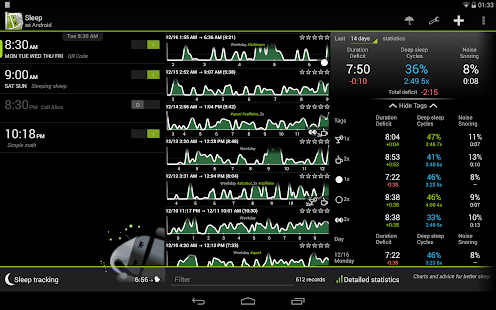
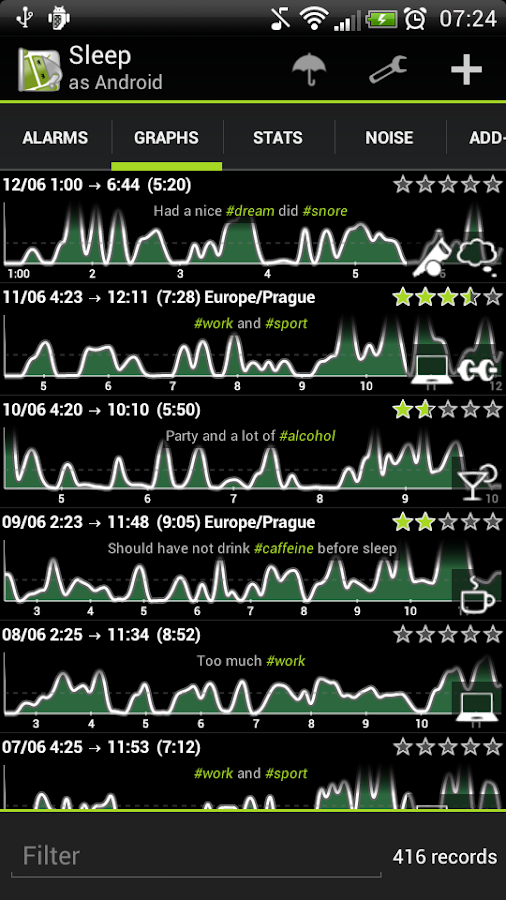
Sleep as Android - screenshot thumbnail
One of the greatest and compatible app for Alarm Tracking, I've found recently. This app is called "Sleep as Android" powered by the team of Urbandroid. This app is Alarm Clock with sleep cycle tracker providing a proper morning wake in a gentle manner.
  • Features
A lot a features available in this app some of the main features listed below:
  1. It provides your sleep statistics in a graphical manner
  2. On the behalf of Social Network Sharing, It also come up with Facebook and Twitter.
  3. Alarm Tone's such as chirping of birds, waves of sea, etc.
  4. Also, select alarm tone from your Music playlist
  5. Captcha for the alarming wake-up available
More information - https://sites.google.com/site/sleepasandroid/
 

Disk Cleanup : A Great Tool in Windows

by Unknown  |  in windows at  12/26/2013
This article is about a great built-in tool "Disk Cleanup" of Windows .
The Disk Cleanup tool helps you free up space on your hard disk by searching your disk for files that you can safely delete. You can choose to delete some or all of the files. Disk Cleaner can perform following tasks to free up some space on your hard disk:

  • Remove temporary Internet files.
  • Remove downloaded program files. For example, ActiveX controls and Java applets that are downloaded from the Internet.
  • Empty the Recycle Bin.
  • Remove Windows temporary files.
  • Remove optional Windows components that you are not using.
  • Remove installed programs that you no longer use.
You can start Disk Cleanup by following methods:

Procedure

 •  Click Start, and then click Run. In the Open box, type cleanmgr, and then click OK. 
          
OR
 •  Click Start, point to All Programs, point to Accessories, point to System Tools, and then click Disk Cleanup. 
           OR
 •  In Windows Explorer or My Computer, right-click the disk in which you want to free up space, click Properties, click theGeneral tab, and then click Disk Cleanup. As Shown in screenshots below


One of the advantage of disk cleaning is that your computer speed increases after removing temporary files. You must run this cleaner weekly to clean up the junk files.

Wednesday, 25 December 2013

3 Considerable SEO Tips

by Peter  |  in Tutorials at  12/25/2013

The SEO (Search Engine Optimization) is the major part to recognize the quality of website or blog. The SEO facilitates you to prove your website or blog to other's as a permanent traffic daily visitors website or blog. The SEO ranks your website on the top of major considerably search engine's as well as top priority has always been given by search engines such as (Google, Bing, Yahoo etc). Search Engine Optimization improves the visibility of a web page or a website, by delivering quality traffic to your blog or website.

Regarding the purpose of SEO Tips, we have made this tutorial to point out the basic and powerful tools of SEO, which may be the best for you.

Here are five SEO Tips listed below:

  • Self Written and Good Content

The content is the powerful tool, which made easiest options for the selectivity of  gaining information for visiting traffic. The good content will surely a good impression for the visitors to visit your website or blog again and again. Further, It also enables the visiting user's to subscribe your blog and get news and feeds directly to their inbox. The content should be SELF-WRITTEN and DELIVERED FROM YOUR MIND. The content should not be copied from other's. You have to improve your blog writing skills. The content should be unique from other's.

  • Option of Social Networking

The Social Media is another a good option to increase your traffic, Place your website or blog URL to the Social Networking emperors such as (Facebook, Twitter, Pinterest etc). Create a community page of your website and get the maximum likes and subscribers on Facebook, Twitter could also helps you to speak your content to others.

  • Submit Site to Google

Google is one of the best choice to produce your web,product or organization in a specific manner, in which one of the best tool of Google Webmaster is SUBMIT SITE TO GOOGLE means place your Web Address on Google. Search these words on Google and you have bends towards your destination.
SUBMIT SITE TO GOOGLE
http://www.google.com/webmasters/tools/submit-url
The screenshot briefing you How to submit your URL to Google!

Newer Posts
© 2014 Mizopedia . Blogger templates by Mizopedia Team
Proudly Powered by Blogger.